# Manual Swaps

The Manual Swaps feature lets you trade tokens directly through Bitfoot by entering the token’s address and setting your preferred parameters (in the [**settings**](https://docs.bitfoot.com/bitfoot-bot/evm-trading/settings/defaults)). You control settings like slippage tolerance and gas fees, allowing for a precise, hands-on trading experience.

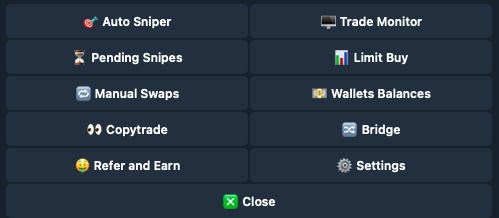
### Main Menu > [🔄](https://emojipedia.org/counterclockwise-arrows-button) Manual Swaps

<figure><img src="https://3111015691-files.gitbook.io/~/files/v0/b/gitbook-x-prod.appspot.com/o/spaces%2FlwujP2ZYsEWYqnEdNMKG%2Fuploads%2FkBlpEjAgRgXh1LiWQvNE%2FScreenshot%202024-05-15%20at%2014.04.47.png?alt=media&#x26;token=8c294225-12cd-4e21-b50f-0c5628190f55" alt=""><figcaption><p>Manual Swaps</p></figcaption></figure>

## How to Perform a Manual Swap

{% stepper %}
{% step %}

### Click on the Manual Swaps Button in the Main Menu

<img src="https://3111015691-files.gitbook.io/~/files/v0/b/gitbook-x-prod.appspot.com/o/spaces%2FlwujP2ZYsEWYqnEdNMKG%2Fuploads%2FsMe0vZHQTiysMCvP2vvL%2FScreenshot%202024-11-02%20at%2014.02.24.png?alt=media&#x26;token=ac3d84da-254a-44a0-80ff-bab9e5dd78cc" alt="" data-size="original">
{% endstep %}

{% step %}

### Enter the Token Address

Start by entering the token address you wish to exchange.
{% endstep %}

{% step %}

### Select Your Wallet

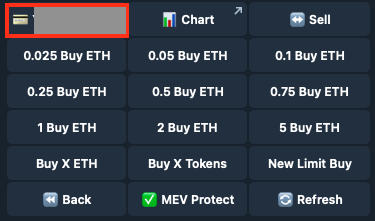
If you have more than one wallet connected to Bitfoot, select the wallet from which you wish to exchange.
<img src="https://3111015691-files.gitbook.io/~/files/v0/b/gitbook-x-prod.appspot.com/o/spaces%2FlwujP2ZYsEWYqnEdNMKG%2Fuploads%2Fl4S8z47n2FQXED86HZqb%2FScreenshot%202024-11-02%20at%2014.04.09.png?alt=media&#x26;token=cb6889c3-4669-4428-994c-1dfad9276966" alt="" data-size="original">
{% endstep %}
{% endstepper %}

{% hint style="info" %}

### **MEV Protect**

Secure transactions against Miner Extractable Value attacks.

### **Chart**

Opens a chart of the token on [coinbrain.com](https://coinbrain.com)

### Refresh

Click Refresh to see the latest statistics.
{% endhint %}

## Buy Functions

<figure><img src="https://3111015691-files.gitbook.io/~/files/v0/b/gitbook-x-prod.appspot.com/o/spaces%2FlwujP2ZYsEWYqnEdNMKG%2Fuploads%2FHoy4DaL3PS0P8eZPe9yV%2FScreenshot%202024-11-02%20at%2014.08.28.png?alt=media&#x26;token=439f99eb-60b9-49ac-baed-75ed944ad2eb" alt=""><figcaption></figcaption></figure>

{% hint style="info" %}

### Buy Predefined Amount in ETH

You can buy token with predefined amount in ETH.

### Buy X ETH

Enter the value of ETH you wish to purchase the token for.

### Buy X Tokens

Input the amount of tokens you with to purchase.

### New Limit Buy

Setup new limit. Enter the value of USD you wish to purchase the token for.

Setup Limit Buy. Learn more about this function in [**Limit Buy**](https://docs.bitfoot.com/bitfoot-bot/evm-trading/limit-buy).
{% endhint %}

## Sell Functions

<figure><img src="https://3111015691-files.gitbook.io/~/files/v0/b/gitbook-x-prod.appspot.com/o/spaces%2FlwujP2ZYsEWYqnEdNMKG%2Fuploads%2FiMOrIJ9L0fsTt81WL89W%2FScreenshot%202024-11-02%20at%2014.15.08.png?alt=media&#x26;token=09ebcd72-e572-4342-84ff-3630eeb153a3" alt=""><figcaption></figcaption></figure>

{% hint style="info" %}

### Sell Initials

Sell all holdings of the same token from selected wallet.

### Sell Percentage

You can choose from predefined values or input your own value.

### **Nuke**

Option to sell all holdings of the same token across all wallets.

### Approve

Approve token for transactions.
{% endhint %}
