> For the complete documentation index, see [llms.txt](https://docs.bitfoot.com/llms.txt). Markdown versions of documentation pages are available by appending `.md` to page URLs; this page is available as [Markdown](https://docs.bitfoot.com/bitfoot-bot/evm-trading/settings/defaults.md).
# Defaults
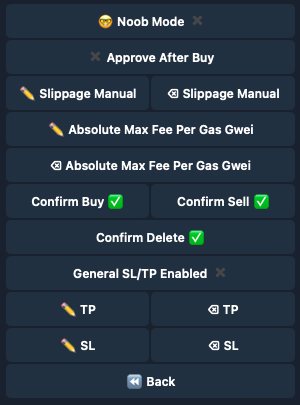
This menu allows you to set some basic variables for trading and affects [**Copy Trading**](/bitfoot-bot/evm-trading/copy-trading.md), [**Manual Swaps**](/bitfoot-bot/evm-trading/manual-swaps.md) and [**Limit Buy**](/bitfoot-bot/evm-trading/limit-buy.md) features.
### Main Menu > Settings > [🥓](https://emojipedia.org/bacon) Defaults
## **Noob Mode**
{% hint style="info" %}
This is a beginner-friendly preset that enables all essential settings and protections for safer trading. In this mode, transactions may be slightly slower, as the bot thoroughly checks the contract’s legitimacy before making a purchase. This added layer of security helps beginners trade with confidence, minimizing risks from suspicious or unsafe tokens.
{% endhint %}
## **Default Settings**
{% hint style="info" %}
### **Use Infinite Slippage For Private Swaps**
* Allows the bot to use infinite slippage for private (non-public) swaps, which can help execute transactions more reliably in cases where price volatility is high. Use this option cautiously, as it may lead to unintended price impacts.
### **Approve After Buy**
* Toggles whether the bot automatically approves tokens for trading after purchasing them. If set to "ON," this feature allows immediate selling after buying without manual approval.
### **Slippage Manual**
* Sets the default slippage tolerance for manual trades as a percentage. This is the amount of price fluctuation the bot will allow when executing a manual trade.
### **Absolute Max Fee Per Gas Gwei**
* Sets an absolute maximum gas price (in Gwei) that the bot will use for any transaction. This acts as a ceiling for transaction fees, ensuring the bot doesn't overspend on gas costs.
### **Confirm Buy**
* When enabled, the bot will prompt for confirmation before executing a buy transaction. Useful for double-checking trades before they are finalized.
### **Confirm Sell**
* When enabled, the bot will prompt for confirmation before executing a sell transaction, helping avoid accidental sells.
### **Confirm Delete**
* When enabled, the bot will prompt for confirmation before deleting any setting or configuration, adding a layer of protection against accidental deletions.
{% endhint %}
## SL/TP Settings
{% hint style="info" %}
## **Take-Profit & Stop-Loss Setup**
**What It Is:**
* **Take-Profit (TP):** Automatically sells your asset when it hits your profit target.
* **Stop-Loss (SL):** Automatically sells your asset to prevent bigger losses if the price drops.
**Why Use It:**
* Locks in profits and limits losses.
* Runs 24/7, even when you're offline.
* Removes emotional trading decisions.
***
#### **How to Set Up SL/TP**
1. **Enable General SL/TP:**
* Go to **Defaults** and turn on **General SL/TP Enabled**.
2. **Set Take-Profit (TP):**
* Enter a percentage where you want to sell for profit.
3. **Set Stop-Loss (SL):**
* Enter a percentage or price to sell if the price drops.
4. **Save Settings:**
* Click **Save** to apply.
***
**Example:**
* **TP:** Set at **+10%** → Bot sells when price rises 10%.
* **SL:** Set at **-5%** → Bot sells if price drops 5%.
{% endhint %}
## Rugpull Detector Settings
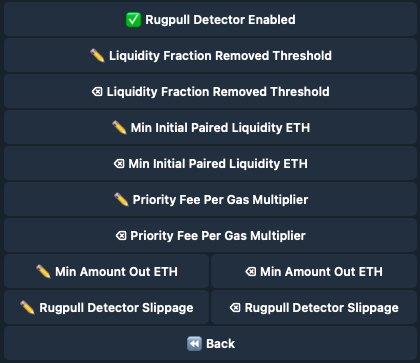
Enable rugpull detection and define criteria such as liquidity removal thresholds and emergency slippage rates to protect against sudden market drops.
Rugpull Settings
{% hint style="info" %}
### **Rugpull Detector Enabled**
* Activates the rugpull detection feature to identify and respond to potential rugpulls.
### **Liquidity Fraction Removed Threshold**
* Sets the threshold for the fraction of liquidity removal that triggers a rugpull alert.
### **Min Initial Paired Liquidity ETH**
* Establishes the minimum initial liquidity paired with ETH required to avoid rugpull alerts.
### **Priority Fee Per Gas Multiplier**
* Applies a multiplier to the priority fee per gas when a rugpull is detected.
### **Min Amount Out ETH**
* Sets the minimum output in ETH for transactions to proceed, especially in potential rugpull scenarios.
### **Rugpull Detector Slippage**
* Specifies the slippage setting applied when a rugpull is detected to exit positions quickly.
{% endhint %}