> For the complete documentation index, see [llms.txt](https://docs.bitfoot.com/llms.txt). Markdown versions of documentation pages are available by appending `.md` to page URLs; this page is available as [Markdown](https://docs.bitfoot.com/bitfoot-bot/solana-trading/pump.fun-snipping.md).
# Pump.fun Snipping
Bitfoot’s Pump.fun feature helps you profit from automated buying (on bonding curve) and selling (on Raydium graduation) process while minimizing risk.
[**Pump.fun**](https://pump.fun/) is a platform where anyone can launch a memecoin on Solana. As people buy these coins on the **bonding curve**, the price increases until the token reaches a **$69,000 market cap**.
At this point, **$12,000 in liquidity** is added to **Raydium DEX**, making the token tradable. However, most of these tokens are high-risk and often rugpull soon after reaching Raydium.
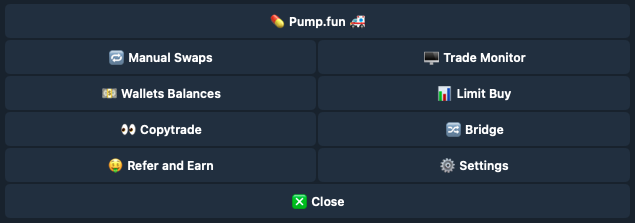
### Main Menu > 💊 Pump.fun 🚑
## How to Setup Automated Buy-Sell Cycle
{% stepper %}
{% step %}
### Click on the pump.fun Button in the Main Menu
* Click on the **New Pump.Fun Auto-Sell** button.
* Enter the pump.fun token address. [How to find pump.fun token address.](#how-to-find-pump.fun-token-address)
{% endstep %}
{% step %}
### Select the Wallet You Wish to Trade With
And click the **Done** button.
{% endstep %}
{% step %}
### Configure Your Trading Settings
You can adjust your:
* Auto-Sell Slippage - set higher % if you expect a lot of trades
* Auto-Sell Priority Fee - to get the trade done faster
* Auto-Sell Amount Percents - if you want to sell all or keep some
* Your auto sell wallets - if you are buying with more wallets
And enable **Auto-Sell** with the button
{% endstep %}
{% step %}
### Buy the Token
Click on the **Trade** button to open the buy menu options.
* You can buy with pre-defined amounts of SOL or set your own amount with the **Buy X SOL** button. You can also buy a specific amount of tokens with the **Buy X Tokens** button. You can also set a limit buy with the [**New Limit Buy**](/bitfoot-bot/solana-trading/limit-buy.md) button.
* The Chart button will open a [**dextools**](https://www.dextools.io/) website with the chart of the token.
{% endstep %}
{% step %}
### Auto-Sell on Raydium Launch
When the token becomes reaches $69,000 and becomes tradable on Raydium, Bitfoot instantly sells it, locking in your profit and reducing rugpull risk.
{% endstep %}
{% step %}
### **If Token Doesn't Reach Raydium**
If the token doesn't reach Raydium, you can sell it manually in the Sell menu.
* Switch from Buy menu to Sell menu and sell desired amount.
{% endstep %}
{% endstepper %}
{% hint style="info" %}
You can check your pending pump.fun trades from Main menu > Pump.fun > Pending Pump.Fun Auto-Sells
{% endhint %}
## **How to find pump.fun token address**
Go to the [**Pump.Fun**](https://pump.fun/) website and find a token you like. A good option is to look at the top of the page where you will see "King of the Hill". There are tokens that have made significant progress towards reaching Raydium and are therefore safer to buy. Alternatively, you can visit [**https://pump.fun/advanced** ]()where you will also see a list of tokens that are close to graduating.
When you find a token and open its page, you will find the token address you need to enter into Bitfoot.
 * Click on the **New Pump.Fun Auto-Sell** button.
* Enter the pump.fun token address. [How to find pump.fun token address.](#how-to-find-pump.fun-token-address)
{% endstep %}
{% step %}
### Select the Wallet You Wish to Trade With
* Click on the **New Pump.Fun Auto-Sell** button.
* Enter the pump.fun token address. [How to find pump.fun token address.](#how-to-find-pump.fun-token-address)
{% endstep %}
{% step %}
### Select the Wallet You Wish to Trade With

 And click the **Done** button.
{% endstep %}
{% step %}
### Configure Your Trading Settings
And click the **Done** button.
{% endstep %}
{% step %}
### Configure Your Trading Settings
 You can adjust your:
* Auto-Sell Slippage - set higher % if you expect a lot of trades
* Auto-Sell Priority Fee - to get the trade done faster
* Auto-Sell Amount Percents - if you want to sell all or keep some
* Your auto sell wallets - if you are buying with more wallets
And enable **Auto-Sell** with the button
{% endstep %}
{% step %}
### Buy the Token
Click on the **Trade** button to open the buy menu options.
You can adjust your:
* Auto-Sell Slippage - set higher % if you expect a lot of trades
* Auto-Sell Priority Fee - to get the trade done faster
* Auto-Sell Amount Percents - if you want to sell all or keep some
* Your auto sell wallets - if you are buying with more wallets
And enable **Auto-Sell** with the button
{% endstep %}
{% step %}
### Buy the Token
Click on the **Trade** button to open the buy menu options.
 * You can buy with pre-defined amounts of SOL or set your own amount with the **Buy X SOL** button. You can also buy a specific amount of tokens with the **Buy X Tokens** button. You can also set a limit buy with the [**New Limit Buy**](/bitfoot-bot/solana-trading/limit-buy.md) button.
* The Chart button will open a [**dextools**](https://www.dextools.io/) website with the chart of the token.
{% endstep %}
{% step %}
### Auto-Sell on Raydium Launch
When the token becomes reaches $69,000 and becomes tradable on Raydium, Bitfoot instantly sells it, locking in your profit and reducing rugpull risk.
{% endstep %}
{% step %}
### **If Token Doesn't Reach Raydium**
If the token doesn't reach Raydium, you can sell it manually in the Sell menu.
* You can buy with pre-defined amounts of SOL or set your own amount with the **Buy X SOL** button. You can also buy a specific amount of tokens with the **Buy X Tokens** button. You can also set a limit buy with the [**New Limit Buy**](/bitfoot-bot/solana-trading/limit-buy.md) button.
* The Chart button will open a [**dextools**](https://www.dextools.io/) website with the chart of the token.
{% endstep %}
{% step %}
### Auto-Sell on Raydium Launch
When the token becomes reaches $69,000 and becomes tradable on Raydium, Bitfoot instantly sells it, locking in your profit and reducing rugpull risk.
{% endstep %}
{% step %}
### **If Token Doesn't Reach Raydium**
If the token doesn't reach Raydium, you can sell it manually in the Sell menu.

 * Switch from Buy menu to Sell menu and sell desired amount.
{% endstep %}
{% endstepper %}
{% hint style="info" %}
You can check your pending pump.fun trades from Main menu > Pump.fun > Pending Pump.Fun Auto-Sells
{% endhint %}
## **How to find pump.fun token address**
Go to the [**Pump.Fun**](https://pump.fun/) website and find a token you like. A good option is to look at the top of the page where you will see "King of the Hill". There are tokens that have made significant progress towards reaching Raydium and are therefore safer to buy. Alternatively, you can visit [**https://pump.fun/advanced** ](
* Switch from Buy menu to Sell menu and sell desired amount.
{% endstep %}
{% endstepper %}
{% hint style="info" %}
You can check your pending pump.fun trades from Main menu > Pump.fun > Pending Pump.Fun Auto-Sells
{% endhint %}
## **How to find pump.fun token address**
Go to the [**Pump.Fun**](https://pump.fun/) website and find a token you like. A good option is to look at the top of the page where you will see "King of the Hill". There are tokens that have made significant progress towards reaching Raydium and are therefore safer to buy. Alternatively, you can visit [**https://pump.fun/advanced** ](