> For the complete documentation index, see [llms.txt](https://docs.bitfoot.com/llms.txt). Markdown versions of documentation pages are available by appending `.md` to page URLs; this page is available as [Markdown](https://docs.bitfoot.com/foot-token/claim.md).
# Claiming
## Overview
The Bitfoot presale officially ended on January 23, 2026, following a community and token holder vote. The **$FOOT Token Generation Event (TGE) is scheduled and currently in preparation**. The exact date will be announced soon via our official channels.
Once the TGE goes live, **$FOOT token claiming will be enabled immediately** for all eligible presale participants. Users will be able to claim their tokens according to the vesting rules outlined in the official [$FOOT tokenomics.](/foot-token/tokenomics.md)
The claiming process described below **will apply once the TGE is live**.
Claiming is accessible through the official Bitfoot website: [**https://bitfoot.com/claim**](https://bitfoot.com/claim)
{% hint style="info" %}
*This process applies to all users who purchased $FOOT during the presale.*
{% endhint %}
***
### Important Notes Before Claiming
* $FOOT was **originally sold via Ethereum wallets** during the presale.
* The $FOOT token was **launched on Solana**.
* Because of this, the claiming process requires:
* **Ethereum wallet** for ownership verification
* **Solana wallet** as the receiving wallet
This is expected behavior and part of the official migration to Solana.
{% hint style="warning" %}
## Warning
*Claiming is **only available via the official*** [***Bitfoot website***](https://www.bitfoot.com/claim)
***Never** share your private keys!*
***Bitfoot will never** reach you first, be aware of scammers!*
***Always** double-check wallet addresses before claiming!*
{% endhint %}
***
## How to Claim $FOOT Tokens
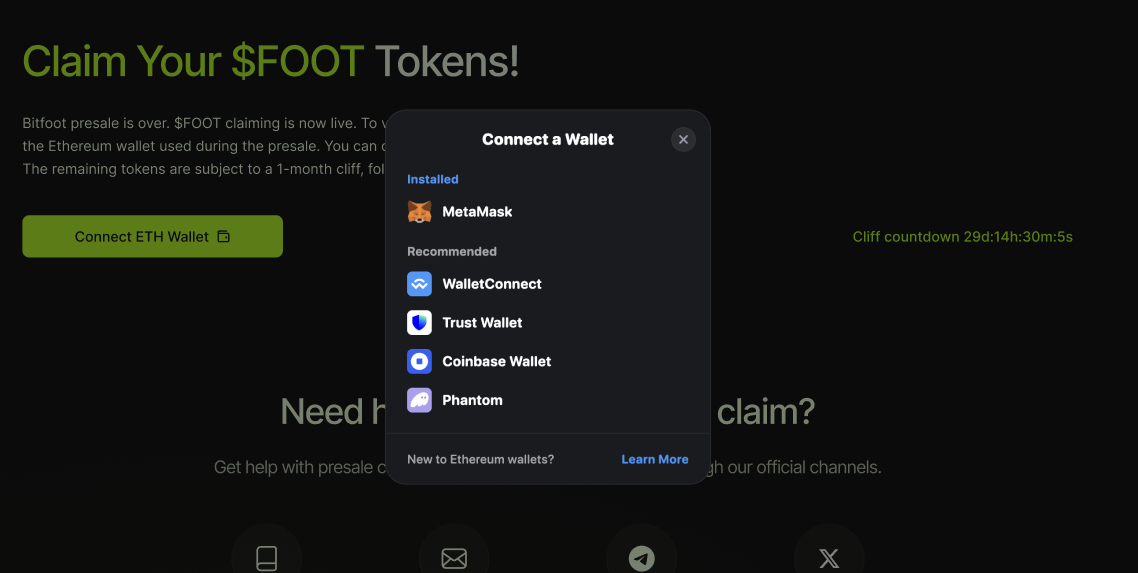
### Step 1: Connect Your Ethereum Wallet
1. Go to [**https://bitfoot.com/claim**](https://bitfoot.com/claim)
2. Connect and verify the **Ethereum wallet** you used to purchase $FOOT during the presale
This step verifies your presale participation and token allocation.
***
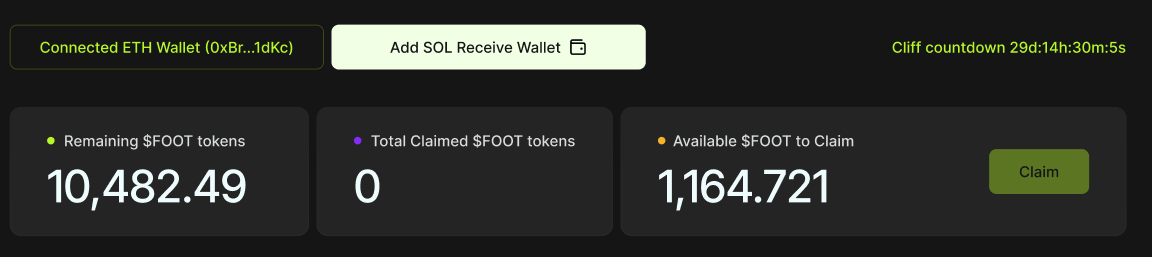
### Step 2: Review Your Allocation
After verification, you will see a dashboard displaying:
* **Total (Remaining) $FOOT allocated**
* **Already claimed tokens**
* **Currently available to claim**
{% hint style="info" %}
**All values already include:**
* Presale purchases
* Referral rewards
* Any additional allocations tied to your wallet
*Everything is calculated **on-chain** and shown per wallet.*
{% endhint %}
***
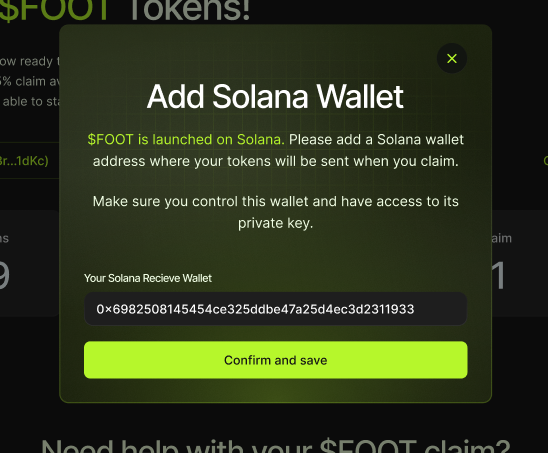
### Step 3: Add a Solana Receiving Wallet
To receive your $FOOT tokens:
1. Connect or enter a **Solana wallet address**
2. This wallet will be used as the **receiving address** for claimed tokens (can be changed anytime)
Make sure you control this wallet. Once claimed, tokens are sent directly to it.
***
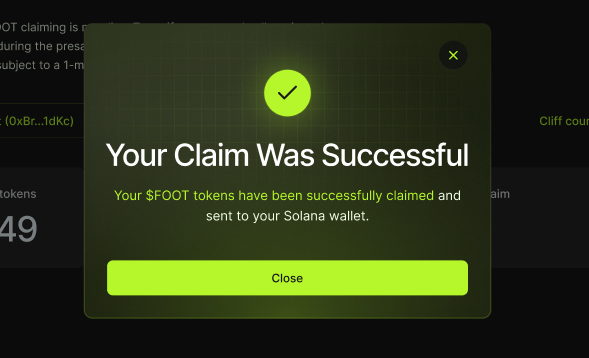
### Step 4: Claim Available Tokens
* Claiming follows the official **vesting and release schedule**
* Only the available amount can be claimed at any given time
* Vesting rules are defined in the [$FOOT tokenomics](/foot-token/tokenomics.md)
Once you confirm the claim:
* Tokens are sent on-chain to your Solana wallet
* You can hold, transfer, or trade them immediately
***
## Vesting & Tokenomics
$FOOT claiming is governed by predefined vesting rules.
These rules determine:
* When tokens become available
* How much can be claimed at each stage
Full vesting details are documented separately in the [**$FOOT Tokenomics**](/foot-token/tokenomics.md) section.
***
## Referral Rewards & Allocations
All referral-related rewards are **already included** in your wallet allocation.
If you:
* Used a referral
* Earned referral bonuses
* Participated in referral programs
Your displayed balance already reflects the **final and correct amount**.
No additional action is required.
***
## Need Help With Claiming?
If you experience any issues, such as:
* Wallet not showing the correct balance
* Claim button not available
* Problems connecting wallets
* Anything that doesn’t look right
Please contact us at: [**support@bitfoot.com**](mailto:support@bitfoot.com)
Our team will help you verify your allocation and resolve any claiming issues.
***
{% hint style="info" %}
## Final Notes
*Claiming is **only available via the official*** [***Bitfoot website***](https://www.bitfoot.com/claim)
***Never** share your private keys!*
***Bitfoot will never** reach you first, be aware of scammers!*
***Always** double-check wallet addresses before claiming!*
*Thank you for being part of Bitfoot and the $FOOT community. 👣*
{% endhint %}